
The Question That Stopped Me Cold
9 years ago, I sat across the table from a potential client who owns multiple restaurant locations. Before we talked about his website, his menus, or his marketing, he pulled out his phone and Googled my name. Right in front of me.
Then he looked up and asked a question I will never forget: “If you’re really good at what you do, why can’t you even rank your own name?”
I gave him the lamest answer I’ve ever given a client. “I’m not really trying to, because I focus on Instant Web Tools as the agency.”
He didn’t miss a beat. “I’m not here for Instant Web Tools. I’m here for a real person.”
My heart was pounding. I was sure that was the deal breaker. I had spent years helping other businesses get found on Google, and I had neglected the one search that mattered most in that moment: my own name.
That conversation taught me something I now tell every business owner I work with. Your Google results are your new business card. Before anyone calls you, hires you, or walks into your store, they search you. Whatever Google shows them is your first impression, whether you built it or not.
Google Decides Who You Are, So Make Sure It Gets It Right
Google doesn’t just list web pages anymore. It tries to understand people, businesses, and how they connect. When it has enough confidence about who you are, it builds a Knowledge Panel: the box with your name, your photo, a short description, and links to your work.
And now there’s AI. Google’s AI Overviews, ChatGPT, and other assistants answer questions about people using the same signals. If those signals are scattered, outdated, or missing, the machines will describe you poorly, confuse you with someone else, or skip you entirely. If the signals are clear and consistent, they work in your favor around the clock.
You can’t buy a Knowledge Panel, and you can’t simply request one. Google builds it when it sees enough consistent proof of who you are. The good news is that the proof is something you can create. These tools are meant to give you and your business more exposure, outreach, and visibility. So let’s use them.
16 Ways to Earn a Google Knowledge Panel
1. Add Schema Markup to Your Website
Schema is code that tells search engines exactly who you are, in their own language. Add Person schema to your homepage with your name, job title, photo, location, the companies you run, and links to your profiles. It’s the most direct way to say “this is me” to Google, and every website we build includes custom schema for this reason.
2. Publish Consistent Articles on Your Personal Website
Invest in your own site and write on it regularly. Each article is another page that connects your name to your expertise. You don’t need to publish daily. You need to publish consistently, on topics you actually know.
3. Rank Your Own Name First
When someone searches your name, your website should be the first result. Put your name at the start of your homepage title, make your About page clear, and request indexing in Google Search Console when you update it. If you can’t rank for your own name, nobody will believe you can rank for anything else. I learned that one the hard way.
4. Share the First Paragraph on Social Media, Then Link Back
Don’t paste your whole article into Facebook or LinkedIn. Share the opening paragraph as a hook, then link to the full post on your website. Your social audience brings traffic, and your website gets the credit.
5. Publish Press Releases
A press release puts your name on news websites that Google already trusts. In my case, I use alejo.press. One release about my book was syndicated to a newspaper’s website, and months later, Google’s AI Overview was still citing it as a source about me. Use releases for real milestones: a launch, a book, an event, an award.
6. Start Podcasting, or Be a Guest
Podcasts are long-form proof of who you are. Guest appearances are even better because they put your name on someone else’s platform. Two of my podcast interviews now show up directly in my Knowledge Panel.
7. Earn Mentions on Other Websites
Google trusts what other people say about you more than what you say about yourself. Leadership pages, partner sites, local organizations, directories, interviews, and guest posts all count. Every mention that uses your name the same way strengthens the signal.
8. Organize Your Content
Scattered content confuses people and machines. Group your articles by topic, use clear categories, and link related posts to each other. When Google can see what you’re known for, it can describe you accurately.
9. Make Your Personal Site the Hub
Your website is the center, and everything else points back to it: social profiles, podcast pages, book listings, business sites. It’s the one place on the internet you fully control, so make it the source of truth about you.
10. Use the Exact Same Name Everywhere
“Dennis” on one platform and “Dennis Alejo” on another look like two different people to a machine. I found one of my own book listings with the author name set to just “Dennis,” and my Knowledge Panel title said exactly that. Pick one name and use it on every profile, listing, and byline.
11. Use One Headshot Everywhere
The same clear, professional photo on your website, LinkedIn, Facebook, YouTube, and partner sites helps Google match your face to your name. Make sure the image is on a public page, crops well into a square, and isn’t blocked by your firewall.
12. Write a Book, or Fix Your Author Bio
Google Books listings are trusted sources, and Google often uses the author bio as the description in your Knowledge Panel. Lead your bio with who you are and what you do in the first sentence, because that’s the line most likely to be shown in search.
13. Post Video Consistently
YouTube is owned by Google, and videos with your name in the title and description show up right inside search results. Short videos count too. Say your name, put it on screen, and link back to your website.
14. Link All Your Profiles Together
Your website should link to every profile, and every profile should link back to your website. In your schema, list those profiles with the sameAs property. This tells Google that all of these accounts belong to the same person.
15. Claim and Verify Your Knowledge Panel
Once your panel appears, search your name, look for the option to claim it, and verify through your official accounts. Verification lets you suggest edits to your name, subtitle, photo, and description. Use the same Google account you’ll remember later. I almost lost access because I had claimed mine with a different account years ago.
16. Audit and Update Regularly
Google your own name every month. Check your title, description, photo, and the sources Google is pulling from. Fix errors at the source, request indexing for updated pages, and keep your numbers and job titles consistent across every site.
What Happened When I Applied It to Myself
I didn’t want to just tell you this works. I wanted to show you, so I went back to my own Google results and fixed them, one step at a time.
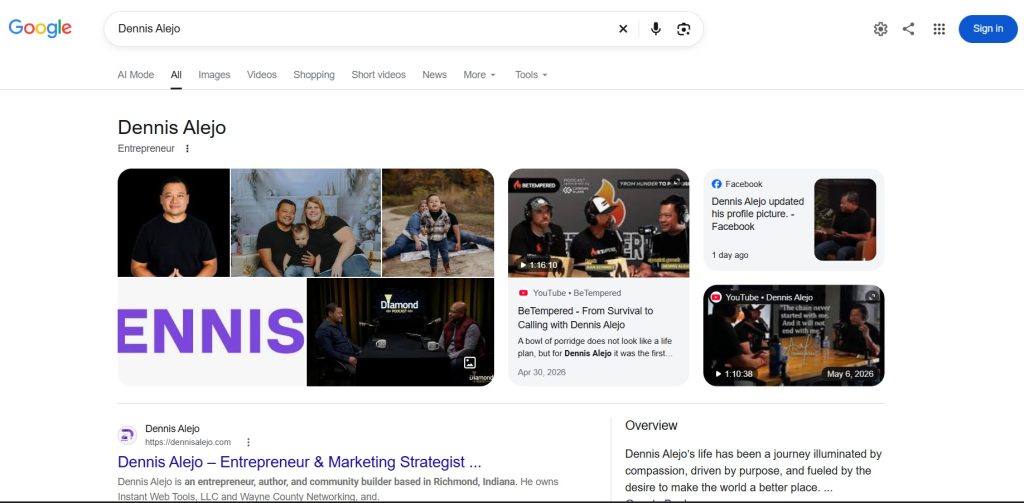
When I started, my Knowledge Panel said “Dennis,” not “Dennis Alejo.” The subtitle said only “Author.” The main image was my logo, not my face. My website title literally read “Dennis Alejo | Dennis Alejo,” and the description stopped mid-sentence.
Here’s what I did and what changed:
- Found and used my verified account. Once I signed in with the account that had claimed the panel, I could suggest edits. The name changed to “Dennis Alejo” within a few hours.
- Suggested a new subtitle. “Author” became “Entrepreneur” the same day.
- Fixed my headshot. My first image submission failed because my website’s firewall was blocking Google from loading the photo. After fixing that and using the same headshot across my sites and profiles, my face replaced the logo as the main image.
- Fixed the book listing. One listing had my name as just “Dennis,” which explained the panel title. I corrected it and rewrote the author bio Google was using as my Overview.
- Rewrote my homepage title. It now reads “Dennis Alejo – Entrepreneur & Marketing Strategist | Richmond, IN,” and Google picked it up shortly after I requested indexing.
None of this required a big budget. It required paying attention to what Google was already saying about me and correcting it at the source.
Now Google Yourself
That restaurant owner was right. People aren’t looking for a company logo. They’re looking for a real person they can trust. Your Google results are the first place they look for that proof.
So here’s your challenge. Open Google and search your own name. Then search “Dennis Alejo” and compare. Ask yourself: if a potential client searched you right now, in front of you, would you be proud of what they found?
If the answer is no, start with three steps this week: use the same name everywhere, add schema to your website, and publish one article that says clearly who you are and what you do. Then keep going down the list.
And if you’d rather have someone do it with you, that’s exactly what we do at Instant Web Tools. We help business owners and leaders get found, get known, and stand out, starting with their own name.