
Want to know how to see if your website page is indexed by Google? Here are four quick ways to check, what every Search Console status really means, and the system I used to get 2,390+ pages indexed on a single website.
On this page
Almost every week, someone tells me the same thing: “Google only indexed a few of my pages.” They built a site with 40, 100, maybe 500 pages, and Google shows a fraction of them. Some think Google is broken. Others assume it caps how many pages a small business is allowed to have in search.
It doesn’t. Google will index thousands of pages from one site if it believes those pages deserve to be there. I’ll show you the proof below, then walk you through exactly how to check your own pages and fix the ones that are missing.
Proof: 2,390 Pages Indexed on One Site
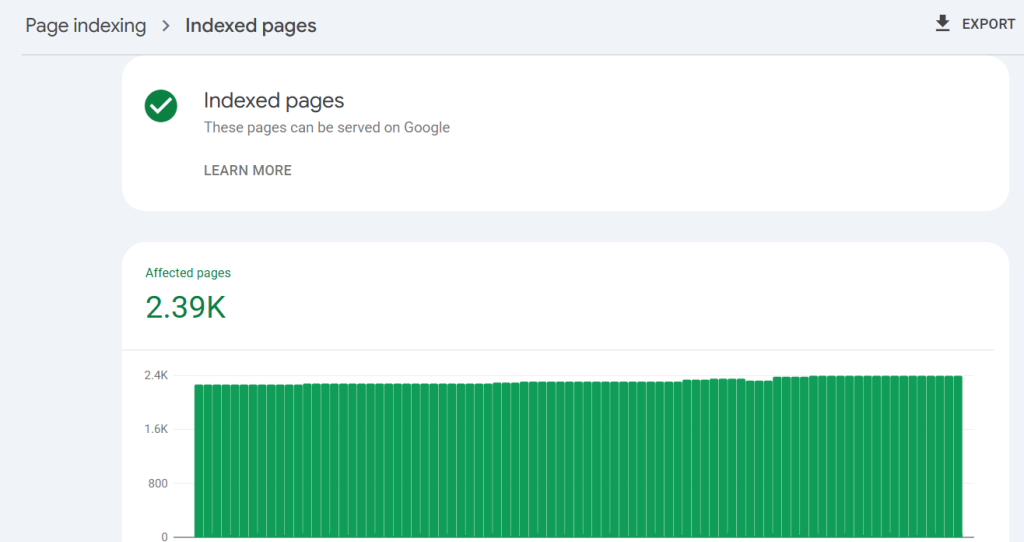
This is the Page indexing report from Google Search Console for one of the websites I manage. Every green bar is a day, and every bar sits close to 2,400 indexed pages. Not crawled. Not discovered. Indexed, meaning Google can serve those pages in search results.

Notice the chart doesn’t spike and crash. That matters. When people use shady “instant indexer” tools, they often see a quick jump followed by Google quietly removing the pages again. A healthy site looks like this: a flat-to-rising line that stays put. So if Google can index 2,390 pages on one site, the question isn’t “Does Google limit me?” The question is “Why doesn’t Google think my pages are worth keeping?” Let’s find out.
Crawled vs. Indexed vs. Ranking: Know the Difference
Before you check anything, get these three words straight. Most of the confusion I see comes from mixing them up.
- Discovered: Google knows the URL exists, usually from a link or your sitemap, but hasn’t visited it yet.
- Crawled: Googlebot visited the page and read it.
- Indexed: Google decided to store the page in its index. Now it can appear in search results.
- Ranking: The page actually shows up for a search someone types, and ideally on page one.
A page can be crawled and never indexed. A page can be indexed and never rank. Each stage is its own gate, and you can’t skip one to reach the next.
4 Ways to Check If a Page Is Indexed by Google
1 The site: search (fastest spot check)
Go to Google and type:
site:yourdomain.com/your-page-url
If your page shows up, it’s indexed. If you see “Your search did not match any documents,” it probably isn’t. You can also type site:yourdomain.com to see a rough list of indexed pages across the whole site.
Warning: the result count from site: is an estimate. I’ve seen it show 600 for a site that had 2,000+ pages indexed. Use it for a quick yes/no on one URL, never as your official count.
2 The URL Inspection tool (the most accurate)
Open Google Search Console, paste the full URL into the search bar at the very top, and press Enter. You’ll get one of two answers:
- “URL is on Google”: indexed. You’re good.
- “URL is not on Google”: not indexed, and Search Console tells you why (more on those reasons below).
From here you can click Test Live URL to see what Googlebot sees right now, and Request Indexing to add the page to Google’s crawl queue. Requesting indexing is a request, not a guarantee, but it’s the right move after you publish or fix a page.
3 The Page indexing report (your whole site at once)
In Search Console, go to Indexing → Pages. This is the report in my screenshot. It shows two numbers: pages indexed and pages not indexed, followed by a list of reasons for the ones Google left out.
Click View data about indexed pages to see the green chart and export the list. Click any reason under “Why pages aren’t indexed” to see the exact URLs affected. This is where you find patterns, like 300 tag pages all marked as duplicates.
4 Search an exact sentence
Copy a unique sentence from your page, wrap it in quotation marks, and search it on Google. If your page appears, Google has indexed that content. This is handy when you don’t have Search Console access, like when you’re checking a competitor or a client site you haven’t been added to yet.
What Each “Not Indexed” Status Means
When Search Console says a page isn’t indexed, the reason it gives is your roadmap. Here are the ones I see most on client sites and what to do about each.
| Status | What it means | What to do |
|---|---|---|
| Discovered – currently not indexed | Google knows the URL but hasn’t crawled it yet, often because it doesn’t see the page as a priority. | Add internal links from strong pages, keep it in your sitemap, and improve server speed. |
| Crawled – currently not indexed | Google read the page and decided it isn’t worth indexing for now. | This is a quality signal. Make the content more useful, more unique, and more complete. |
| Duplicate without user-selected canonical | Google thinks the page copies another one and you didn’t say which is the original. | Add a canonical tag, merge near-identical pages, or rewrite them so each is clearly different. |
| Alternate page with proper canonical tag | You told Google another URL is the main version. | Usually fine. No action needed if that’s intentional. |
| Excluded by ‘noindex’ tag | The page tells Google not to index it. | Remove the noindex if you want it in search. On WordPress, check Settings → Reading and your SEO plugin. |
| Blocked by robots.txt | Your robots.txt file stops Google from crawling the page. | Edit robots.txt to allow it if the page should rank. |
| Soft 404 | The page loads but looks empty or like an error page. | Add real content or return a proper 404/301. |
| Page with redirect | The URL redirects somewhere else. | Normal. Make sure your sitemap lists the final URL, not the redirect. |
Don’t panic over every “not indexed” line. Redirects, canonicals and intentional noindex pages are supposed to be there. The two statuses that deserve your attention are Crawled – currently not indexed and Discovered – currently not indexed. Those are Google telling you it isn’t convinced yet.
Why Google Only Indexes a Few of Your Pages
When someone tells me Google only indexed a handful of their pages, it’s almost always one or more of these:
Thin or duplicate content
If your 50 service-area pages say the same thing with only the city name swapped, Google sees one page written 50 times. It will index a few and ignore the rest. Every page needs a reason to exist that the other pages don’t already cover.
Orphan pages with no internal links
If no other page on your site links to a page, Google treats it as unimportant. Your sitemap tells Google a page exists; your internal links tell Google it matters.
A messy or default sitemap
Many default sitemaps include tag archives, author pages, attachment pages and other junk. That waste of crawl attention dilutes the pages you actually care about. Your sitemap should be a curated list of the pages you want ranked, nothing else.
Technical blocks
A leftover noindex from development, a robots.txt rule, a wrong canonical, or a “Discourage search engines” checkbox in WordPress can quietly remove whole sections of a site.
Slow or unreliable hosting
If your server is slow or throws errors, Google crawls less to avoid overloading it. Fewer crawls means fewer pages getting a fair chance.
A new site with little authority
New domains get less trust. Google indexes them more cautiously until it sees links, mentions and consistent publishing.
How I Got 2,390+ Pages Indexed
There’s no secret plugin behind that green chart. It’s a structure. Here’s the system I use on large sites, and you can scale it down to a 20-page small business site.
1. A clear hierarchy
Every page lives in a logical parent-child structure: Home → Category → Subcategory → Page. Breadcrumbs on every page reflect that path, and breadcrumb schema tells Google the same thing in code. When Google understands where a page sits, it understands why the page exists.
2. Deliberate internal linking
Each page links up to its parent, across to related siblings, and down to its children. No page is an orphan. On big sites I plan these links in a spreadsheet before a single page goes live.
3. Custom, segmented XML sitemaps
Instead of one giant default sitemap, I split it by section: one for core pages, one for the blog, one for each major category. Each has accurate lastmod dates. When one section has indexing problems, I spot it immediately in Search Console because each sitemap reports its own numbers.
4. Every page earns its place
Large sites get indexed when each page answers a specific question better than anything else on the site. Big page counts only work when every page is genuinely different.
5. Structured data and AI readability
Schema markup tells Google exactly what a page is: an article, a person, a FAQ, a breadcrumb trail. I also publish an llms.txt file so AI tools like ChatGPT, Claude and Perplexity can understand the site quickly. Search is no longer just ten blue links, and your content should be readable by every engine that might recommend you.
6. Fast, stable hosting
Lightweight pages on a fast server get crawled more often. More crawls means new and updated pages make it into the index faster.
Your Indexing Checklist
Run through this the next time you publish a page, or today for the pages Google is ignoring:
- ✓Inspect the URL in Search Console and confirm it’s “on Google.”
- ✓Make sure the page has no noindex tag and isn’t blocked by robots.txt.
- ✓Check that the canonical tag points to the page itself.
- ✓Link to it from at least two or three relevant pages on your site.
- ✓Include it in your XML sitemap, and submit that sitemap in Search Console.
- ✓Make sure the content is unique and fully answers one clear question.
- ✓Add schema markup that fits the page type.
- ✓Click Request Indexing after publishing or making major updates.
- ✓Check the Page indexing report monthly for new patterns.
Frequently Asked Questions
How long does it take Google to index a new page?
Anywhere from a few hours to several weeks. Pages on established, well-linked sites often get indexed within days. New domains and pages with no internal links take longer.
Is the site: search count accurate?
No. The site: operator gives a rough estimate. For the real number, use the Page indexing report in Google Search Console.
Does requesting indexing guarantee my page gets indexed?
No. Request Indexing adds the URL to Google’s crawl queue. Google still decides whether the page is worth indexing based on quality, uniqueness and site signals.
What is the difference between crawled and indexed?
Crawled means Googlebot visited the page. Indexed means Google stored it and can show it in search results. A page can be crawled and still not indexed.
Why does Google only index a few pages of my website?
The usual causes are thin or duplicate content, pages with no internal links, a missing or messy XML sitemap, noindex tags, canonical mistakes, slow servers and low overall site authority.
Want Google to Index Your Pages?
If Google is ignoring your pages, my team at Instant Web Tools can audit your site, fix the technical blocks, and build the structure that gets pages indexed and ranking. We manage 400+ websites and know what Google wants to see.